
PCI Compliance Explained

If your business handles credit card payments, PCI compliance is an essential security measure. 

However, many business owners, especially those just starting out or scaling up, have a hard time understanding what PCI DSS (Payment Card Industry Data Security Standard) entails. It’s a detailed process that can feel both confusing and overwhelming. 

As a payments provider, we’re well-versed in PCI compliance and can help guide you through this process. 

In this guide, we’ll break down the essentials of PCI compliance and answer common questions to help you stay secure and avoid costly penalties. 

What Is PCI Compliance? 

PCI DSS (Payment Card Industry Data Security Standard) is a set of security standards designed to ensure all companies that accept, process, store, or transmit credit card information maintain a secure environment. 

The PCI Security Standards Council – founded by major credit card brands like Visa, MasterCard, American Express, Discover, and JCB – developed these standards to help prevent data breaches and fraud. 

Being PCI compliant means your business adheres to these standards, protecting both your customers and your company from potential risks. 

Why Is PCI Compliance Important? 

  • Legal & Contractual Obligation: Card brands and payment processors require businesses to comply. 
  • Risk Mitigation: Non-compliance increases the risk of data breaches, fraud, and cyberattacks. 
  • Avoiding Fines: Penalties for non-compliance can range from $5,000 to $100,000 per month. 
  • Customer Trust: Demonstrating security strengthens consumer confidence in your brand. 

PCI Compliance Levels 

PCI compliance is broken down into four levels, based on transaction volume: 
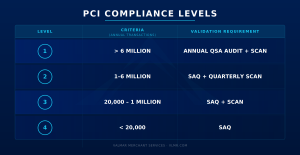
Most small-to-medium businesses fall into Level 3 or 4, where completing a Self-Assessment Questionnaire (SAQ) and performing quarterly vulnerability scans is often enough. 

Level 1 merchants – those who process more than 6 million card transactions per year – are required to use a third-party auditor. These audits are performed by qualified security assessors, also known as QSAs. These auditors are approved by the PCI SSC to conduct an on-site review to ensure compliance. 

The Basics of PCI Compliance 

When your business is considered PCI Compliant, you meet the following requirements: 

Basic requirements: 

  • Build and maintain a secure network and system 
  • Protect cardholder data 
  • Maintain a vulnerability management system 
  • Implement strong access control measures 
  • Regularly monitor and test networks 
  • Maintain an information security policy and procedures 

Common PCI Compliance Questions Answered 

  1. Why didn’t I need to be PCI compliant with Square?

You didn’t need to worry about PCI compliance with Square because they act as a payment facilitator (PayFac), meaning they handle the security, compliance, and certification requirements on behalf of all their merchants. Essentially, you operate under Square’s PCI scope rather than your own.  

While this makes setup simple, it also means you’re bound by Square’s policies and risk rules. If Square changes its terms or decides your business type no longer fits within its acceptable use categories, your account could face sudden holds, restrictions, or even shutdowns without warning. 

That’s why it’s crucial to work with a reliable provider like Valmar, especially if you’re in a high-risk industry.  

  1. What is an SAQ and which one do I need?

An SAQ (Self-Assessment Questionnaire) is a set of yes/no questions that help determine your PCI compliance. There are multiple types (A, A-EP, B, C, D, etc.), each depending on how you process payments (e.g., online vs. in-store vs. using third-party platforms). 

  • SAQ A: For merchants fully outsourcing payment processing (e.g., using a hosted checkout like Stripe Checkout). 
  • SAQ B: For merchants using standalone dial-out terminals. 
  • SAQ D: For merchants storing cardholder data or handling complex environments. 

Your processor or security vendor can help determine the right form. 

  1. What happens if I’m not PCI compliant?

Non-compliance can result in: 

  • Hefty monthly fines from card networks. 
  • Increased liability in case of a data breach. 
  • Termination of your merchant account. 

It’s not just a formality and failure to comply can impact your business significantly. 

  1. Do I need to complete PCI compliance every year?

Yes. PCI compliance is not a one-time task. You must validate it annually, and in most cases, complete quarterly vulnerability scans (if applicable). 

  1. Is storing credit card information allowed?

Not usually. Storing cardholder data (especially sensitive data like CVV or magnetic stripe) is strongly discouraged and restricted. Most small businesses should avoid storing any card data and instead use tokenization or outsource to a PCI-compliant provider. 

  1. Is PCI compliance the same as general cybersecurity?

Not exactly. PCI DSS is a specific set of standards, while cybersecurity is broader. However, PCI compliance is a good baseline for strong payment security practices. 

  1. How much does it cost to be PCI Compliant?

The cost of PCI Compliance can vary greatly depending on your organization level and setup.  

For small businesses, PCI compliance can cost around $300 per year. For larger enterprises requiring an assessment, PCI compliance can be upwards of $70,000. 


How to Get Started with PCI Compliance 

  1. Check with your payment processor : Many offer built-in tools or partner services. 
  2. Identify your SAQ type: Based on how you process payments. 
  3. Complete the SAQ annually: Be honest and accurate. 
  4. Perform quarterly scans: If your environment requires it. 
  5. Fix gaps or vulnerabilities: Remediation is key for validation. 

PCI compliance doesn’t have to be intimidating. With the right tools and understanding, most businesses can stay compliant without excessive overhead. Whether you’re running a small Shopify store or a growing SaaS platform, ensuring PCI compliance is a fundamental step in protecting your business and customers. 

10 Proven Marketing Tips to Boost Small Business Sales 

Starting a small business is exciting but it can also feel overwhelming when it comes to marketing. With limited time and budget, you need strategies that actually work and won’t drain your resources. By focusing on clear messaging and the right channels, you can make the most of your resources. 

A few smart marketing moves can help you reach customers, build credibility, and boost revenue from the start. Here are some proven tips to get your marketing off the ground:

  1. Start With Your Ideal Customer in Mind

Before spending a dollar on ads, get clear about who you’re trying to reach. Ask yourself: 

  • Who is most likely to buy my product or service? 
  • Where do they spend their time (online and offline)? 
  • What problem am I solving for them? 

A laser focus on your target customer will help you choose the right channels and messages instead of spreading yourself too thin. 

  1. Claim Your Digital Real Estate

Even if you don’t have a full website yet, getting a simple landing page is easy and effective for having customer discover your online presence. Here’s how to make sure customers can find you: 

  • Create a Google Business Profile so you show up on Maps and local searches. Ensure your business information is up-to-date and accurate. Add high-quality photos and videos  to appeal to customers.  
  • Set up social profiles on the platforms your audience uses most (often Instagram, Facebook, or TikTok).  
    • Tip: Depending on your bandwidth, it’s better to stick to one platform that you can post on consistently rather than create profiles for every platform.  
  • Make your contact info, hours, and payment methods crystal clear everywhere you’re listed. 

This is the foundation that makes all other marketing efforts more effective. 

  1. Use Social Media to Tell Your Story

You don’t need fancy production because on social media, authenticity wins. Share behind-the-scenes posts, introduce your team, show your product in action, or highlight happy customers. A consistent presence builds familiarity and trust. 

Tip: Use short-form video (Reels, TikToks, YouTube Shorts). It gets higher reach, and you can repurpose the same content across multiple platforms. You can use your phone to record videos and edit the videos for free on apps like TikTok or CapCut. 

  1. Collect Emails from Day One

Even if you’re not sending polished newsletters yet, start building an email list. Offer something small in exchange for emails like a discount code or free sample. 

Email marketing is one of the most cost-effective ways to bring customers back. It lets you send offers, announce new products, or simply remind people that you exist. 

Most websites will offer an email capture tool. You can then connect to a free email marketing tool like MailChimp to start sending out communications. 

  1. Optimize Your Website for Conversions

Your website is often the first impression of your business. Make sure it’s mobile-friendly, easy to navigate, and has clear calls-to-action (like “Buy Now,” “Book a Call,” or “Sign Up”).  

Simple tweaks, like adding testimonials or improving product photos, can dramatically increase sales. 

  1. Run Promotions and Limited-Time Offers

Scarcity drives action so try and incorporate flash sales, limited-time discounts, or bundled offers. This creates urgency and encourages quick decisions.  

Promote these offers across email and social channels for maximum reach. 

  1. Encourage Online Reviews

Social proof matters. Positive reviews on Google, Yelp, or industry-specific platforms build credibility and influence buying decisions.  

Ask happy customers to leave reviews and make it easy for them with direct links. You can include these links on your receipts, in email confirmations, or in-store QR codes.  

  1. Invest Small in Targeted Ads

A modest ad spend, think $5–$10 a day, can go a long way when targeting locally. 

 Options include: 

  • Facebook/Instagram ads aimed at people within a certain zip code. 
  • Google Ads for keywords customers use when they’re ready to buy (e.g., “best coffee near me”). 
  • Boosted posts for high-performing social content. 

Start small, track results, and double down on what works. 

  1. Turn Every Customer into a Marketer

Word of mouth is gold for new businesses. Encourage referrals by: 

  • Offering a small discount or perk for both the referrer and referee. 
  • Giving away stickers at checkout.  
  • Adding a friendly “If you loved us, tell a friend!” to receipts or emails. 
  • Creating a shareable moment – like a photo-worthy packaging or branded hashtag. 

Your happy customers can become your most powerful sales team. 

  1. Measure, Learn, Adjust

Marketing is not “set it and forget it.” Pay attention to what drives sales, whether that’s Instagram posts, Google searches, or local flyers. Free tools like Google Analytics, Facebook Insights, and your payment processor’s reports can help you spot trends. 

Double down on what brings results and don’t be afraid to drop what doesn’t. 

You don’t need a massive budget or a professional marketing team to grow your small business. Start with a few focused tactics: know your audience, show up online, collect customer info, and test small ad campaigns. Over time, you’ll build both visibility and trust, and that translates directly into revenue. 


Free Tools to Take Action 

MailChimp: Lets you send emails to contacts to keep them informed, engaged, and coming back.  

Canva: Gives you the tools to create social media graphics and edit pictures with a range of free templates.  

ChatGPT: Generate content for your website and social media instantly using AI. 

Yelp: Get your business seen by locals. 

Buffer: Allows you to schedule out social media posts in advance to have a consistent posting schedule.  


Additional Recommendations for Limited Bandwidth 

Recruit interns or contractors. When cash is limited, consider hiring interns or contract-based workers to gain specialized skills and resources for a specific project without the expense of a full-time hire. 


Payment Processing for Small Businesses 

If you’re a new business, you’re probably looking for a payment processor to help you navigate the process of accepting payments.  

Beyond just accepting credit cards or mobile payments, the right provider helps you get paid faster, reduce costs, and create a seamless checkout experience for your customers. 

With Valmar, you get a payments partner that has transparent pricing, easy setup, and tools designed to grow with your business. We take the complexity out of payments so you can focus on what matters most – serving your customers and increasing sales. If you’re ready to simplify transactions, contact us today. 


Top 15 Common Payment Processing Terms Every Merchant Should Know

Payment processing can sometimes seem confusing or intimidating to merchants, especially for new entrepreneurs. To help you understand better and make informed decisions, we’ve compiled a list of the top 15 common payment processing terms every merchant should know. Understanding these terms will be incredibly helpful for managing your payment processes efficiently and ensuring smooth, secure transactions.
  1. Merchant Account

Definition: A merchant account is a specialized bank account that enables businesses to accept and process electronic payment card transactions, including credit and debit cards. It is typically set up through a merchant acquiring bank.

A merchant account acts as the intermediary between your business and the customer’s bank account. It ensures that payments are transferred securely and efficiently. Think of it as the cornerstone of your payment processing operations.

  1. Payment Gateway

Definition: A payment gateway is a service that securely transmits credit card information from a website to the credit card network for processing.  Then it returns the transaction details and responses back to the website.

It serves as the virtual equivalent of a point-of-sale terminal.  This ensures that your customers’ data is encrypted and secure during online transactions. Choosing a reliable payment gateway is critical for the safety and efficiency of your e-commerce operations.

  1. Acquirer (Acquiring Bank)

Definition: An acquirer, or acquiring bank, is a bank or financial institution that processes credit and debit card payments on behalf of the merchant. The acquirer is responsible for settling funds with the merchant.

Essentially, your acquiring bank helps ensure all card transactions are processed flawlessly.  This can have a direct impact your cash flow and overall financial health.

  1. Issuer (Issuing Bank)

Definition: The issuer, or issuing bank, is the bank or financial institution that provides the customer with a payment card (credit or debit). The issuer is responsible for paying the acquirer for approved transactions.

The issuing bank acts as the customer’s financial protector.  It ensures that funds are available for the transaction and managing any potential disputes or fraud claims. Understanding the issuer’s role can provide insight into the entire payment ecosystem.

  1. Chargeback

Definition: A chargeback is a reversal of a credit card transaction initiated by the cardholder’s bank, often due to disputes over non-authorized transactions, dissatisfaction with products/services, or fraud.

Chargebacks can be detrimental to your business, leading to potential revenue losses and damaging your merchant account standing. Employing strategies to minimize chargebacks is key to maintaining a healthy merchant account.

  1. Interchange Fee

Definition: The interchange fee is a fee paid between banks for the acceptance of card-based transactions. Typically, the merchant’s bank (acquirer) pays the issuing bank this fee to cover handling costs, fraud risk, and credit risk.

Interchange fees form the backbone of fee structures in the payment processing industry. Understanding these fees can help you budget more effectively.

  1. Payment Processor

Definition: A payment processor is a company that handles the transaction process between merchants, financial institutions, and customers, ensuring that payments are securely and efficiently transferred.

The payment processor works behind the scenes, making sure that transactions are authorized, funds are settled, and any potential issues are quickly resolved. Choosing the right payment processor can impact the reliability of your operations.

  1. Authorization

Definition: Authorization is the process of verifying whether a customer’s payment method has sufficient funds and is approved for the transaction. This is the initial step in processing a payment.

Securing authorization is akin to a checkpoint in the transaction journey. Without this approval, the transaction cannot proceed, making it a critical step in ensuring smooth and secure payment processing.

  1. Settlement

Definition: Settlement is the process of transferring funds from the customer’s issuing bank to the merchant’s acquiring bank, finalizing the payment after authorization.

Settlement marks the completion of the transaction cycle, converting pending authorizations into actual payments in your account. Efficient settlement processes are vital for maintaining healthy cash flow.

  1. Point of Sale (POS)

Definition: The point of sale, or POS, is the location or system where a transaction takes place between a merchant and a customer, typically involving a physical or virtual terminal that processes payments.

Your POS system bridges the gap between the customer’s intent to purchase and the actual payment. A robust POS system can enhance customer experiences and streamline operations.

  1. PCI Compliance

Definition: PCI compliance refers to adhering to the Payment Card Industry Data Security Standard (PCI DSS), a set of security standards designed to ensure that all entities that process, store, or transmit credit card information maintain a secure environment.

PCI compliance is non-negotiable for any business handling credit card transactions. It safeguards against data breaches, ensures customer trust, and helps avoid hefty penalties.

  1. Rolling Reserve

Definition: A rolling reserve is a security measure by which a percentage of a merchant’s revenue is held back by the payment processor for a certain period to cover potential chargebacks, refunds, or fraud.

While the concept of a rolling reserve might seem daunting, it’s a measure designed to protect both the merchant and the payment processor. Understanding how it works can help you manage your cash flow and financial planning more effectively.

13. Payment Facilitator (PayFac)

Definition: A Payment Facilitator is a company that allows small businesses to accept card payments without having to set up their own direct merchant account with a bank. Instead, the PayFac manages the relationship with the processor and “onboards” businesses under its master account. This makes setup faster, though it usually comes with higher fees, more risk, and less customization than a traditional merchant account.

14. Interchange-Plus Pricing

Definition: Interchange-Plus Pricing is a transparent fee model where the processor passes along the actual interchange rate (the non-negotiable cost set by card networks) plus a fixed markup. For example: interchange fee + 0.25% + $0.10 per transaction. Business owners like this model because they can see exactly what goes to the card networks versus what goes to the processor.

15. Fixed Rate / Flat Rate Pricing

Definition: Fixed Rate (or Flat Rate) Pricing means every transaction is charged the same percentage and per-transaction fee, no matter the card type. For instance, 2.9% + $0.30 per sale. This model is simple and predictable, but it can hide the true underlying costs, making it more expensive for businesses with higher volumes or many debit card transactions.


Understanding these 15 common payment processing terms can significantly contribute to smoother transactions and more informed financial planning for your business. At Valmar, we are committed to providing transparent pricing, exceptional customer service, and reliable payment processing solutions, even for high-risk industries. Understanding these key terms will empower you to take full advantage of our services and foster a more secure and efficient payment environment for your business. Reach out to us for any queries or assistance in optimizing your payment processing system.

Our dedicated team cares about our clients as individuals and business owners.  It’s challenging to operate and grow a business, so we provide resources and support for our merchant clients.  With enough other concerns, you shouldn’t have to worry about your payment processing. (Especially if you’re in a high-risk industry.)  At Valmar, we give our merchants a level of comfort, clarity, and peace of mind unrivaled in payment processing with next level customer service.  If you want a payment processor that cares about you, contact us—we’re here to help!


How Merchants Can Reduce Chargebacks

Chargebacks are one of the most frustrating realities of running a business. They don’t just cost you the transaction amount, they also come with additional fees, lost inventory, and time spent resolving the issue. But the good news? Chargebacks can be prevented or greatly reduced. 

In this article, we’ll break down why chargebacks happen and the practical steps merchants can take to reduce them.

Why Do Chargebacks Happen? 

Chargebacks are reversals of card charges initiated by the cardholder. They occur when a customer disputes a transaction with their bank. Common reasons include: 

  • Fraudulent transactions: The card was stolen and used 
  • Unrecognized billing descriptors: The customer doesn’t recognize your business name 
  • Product or service dissatisfaction: The item not as described, defective, or the customer received poor service. 
  • Shipping issues: The customer experienced delays, received the wrong item, or never received the item.  
  • “Friendly fraud”: The customer forgets the purchase or tries to get an item for free. 
  • Subscription Cancellation Disputes: A recurring charge was disputed after a subscription service was cancelled.  
  • Duplicate Processing: The same transaction was charged multiple times.  
  • Incorrect Amount Charged: The charge was for the wrong amount.  

Understanding these root causes is the first step to prevention. Knowing the common reasons for chargebacks, we can put measures in place to help reduce them.  

1. Prevent Chargebacks Before They Happen

“Most merchants are reactive to chargebacks, but the BEST way to combat them is being proactive and eliminating the headaches before they start” – Brian Fehr, Senior Operations Manager, Valmar

  • Write clear product descriptions: Customers should know exactly what they’re buying. 
  • Use accurate images: Multiple, high-quality product photos reduce “not as described” disputes. 
  • Make policies visible: Refund, return, and cancellation policies should be easy to find and easy to understand. 
  • Track and confirm deliveries: Always provide tracking numbers and get signatures for high-value items.

2. Optimize Your Payment Practices

  • Clean billing descriptors: Ensure your statement name matches your brand. Many chargebacks happen because customers don’t recognize the charge. 
  • Use fraud checks: AVS (Address Verification Service) and CVV help confirm the cardholder’s identity. 
  • Enable 3D Secure: Programs like Visa Secure and Mastercard Identity Check shift liability to the issuer and protect you. 
  • Monitor transaction sizes: Flag unusually high or inconsistent orders for manual review. 

3. Strengthen Fraud Prevention

  • Fraud detection software: Many modern gateways use AI to flag risky transactions. Ask your payment processor for more information on their fraud detection.  
  • Blacklist repeat offenders: Track customers who frequently request chargebacks. 
  • Watch for red flags: Look out for customers using rush shipping, and those who have mismatched billing/shipping addresses, or multiple failed attempts. 

 4. Improve Customer Experience

Most chargebacks can be avoided with good customer communication: 

  • Be responsive: Offer phone, chat, or email support that’s easy to find. 
  • Be proactive: Send order confirmations, shipping updates, and delivery notifications. 
  • Refund strategically: Sometimes issuing a refund is cheaper than fighting a dispute.

5. Manage and Fight Chargebacks Effectively

When chargebacks do happen, preparation is key: 

  • Keep records: Invoices, receipts, delivery confirmations, and customer communications are critical evidence. 
  • Respond quickly: Processors often require responses within 7–14 days. 
  • Use chargeback alerts: Your payment processor, along with third-party services, can notify you of disputes early. 
  • Fight “friendly fraud”: Use delivery proof, customer service logs, or screenshots to win representments. 


The Benefits of Reducing Chargebacks 

Chargebacks may never disappear entirely, but with the right prevention, fraud tools, customer service, and dispute management, merchants can reduce their impact. 

The key is to be proactive: prevent disputes before they happen, make it easy for customers to reach you, and always keep records ready in case you need to fight back. 

“Chargebacks are not a reflection of you and your business, however, they can indicate gaps in customer support, fulfillment, and others areas that you can improve on to alleviate chargebacks! – Brian Fehr, Senior Operations Manager, Valmar

By following these steps, you’ll protect your revenue, improve customer trust, and build a healthier payment ecosystem for your business. 

Download your Chargeback Reduction Checklist 

To make it easier for your business to reduce chargebacks, we’ve created a free checklist with all of the measures you should have in place. Fill out the form below and the checklist will be sent to your email.

Free Chargeback Reduction Checklist

"*" indicates required fields

This field is for validation purposes and should be left unchanged.